










What makes it special is its designer-friendly workflow—you can create pixel-perfect layouts, smooth animations, and interactive components without heavy coding.
It’s especially popular among startups, creative teams, and product designers who want their sites to look and feel like polished apps rather than static brochures.
Framer is very similar to Figma in terms of element formatting style and control layout.
Why Look for Alternatives?
Despite its strengths, Framer isn’t the perfect fit for everyone. In 2025, many teams are exploring alternatives for reasons such as:
- Cost – subscription pricing can be high for scaling projects or larger teams, especially for multiple editors. Adding multiple languages can increase the costs significantly.
- Learning Curve – designers love it, but non-designers may find it complex compared to simpler builders.
- CMS & E-commerce Needs – Framer’s content management and e-commerce features are limited compared to platforms built for these use cases.
- Team Collaboration – larger organizations often need stronger multi-user workflows, permissions, or integrations.
- Performance & SEO – depending on build choices, some users prefer platforms with more mature optimization tools.
- Scalability – as projects grow, the flexibility of hosting, backend integrations, and content modeling can become critical.

Our Comparison Criteria
To fairly review Framer alternatives, we’ll use the following criteria:
- Design Flexibility & Visual Fidelity – how closely you can control layouts, styles, and animations.
- Ease of Use & Learning Curve – beginner-friendliness vs. advanced capabilities.
- Content Management – strength of CMS features for blogs, multi-author sites, or dynamic content.
- E-commerce Capabilities – how well the platform supports selling products and services.
- Collaboration & Integrations – team features, permissions, third-party tools, and APIs.
- Performance & SEO – site speed, Core Web Vitals, and search optimization tools.
- Pricing & Scalability – value for money, hidden costs, and ability to scale with your project.
Top 5 Alternatives for Framer in 2025: Detailed Notes
Here are the picks, with pros/cons, trends, etc.
1. Webflow
What it offers
- Very strong design fidelity and flexibility. You can do layouts, custom interactions, animations.
- Good CMS built-in, better content management features.
- More mature for scaling larger sites & more complex sites vs Framer.
- Great template library – with fresh designs
Weaknesses vs Framer
- Steeper learning curve, especially for non-designers / beginners.
- Can get expensive when you need more CMS items, team seats, advanced features.
- Sometimes slower iteration if you need rapid prototyping of micro-interactions, depending on the task.
Best use case
- Agencies, experienced designers wanting precision + scalability.
- Content-rich sites / blogs / portfolios that will grow.
- Projects where custom code / integrations might matter.
2. WordPress + Modern Page Builders (Low-code / No-code)
WordPress remains the world’s most popular CMS, powering over 40% of the web.
While its core is content-first, modern page builders like Elementor, Divi, Bricks, or the native Gutenberg block editor have transformed WordPress into a powerful visual design tool.
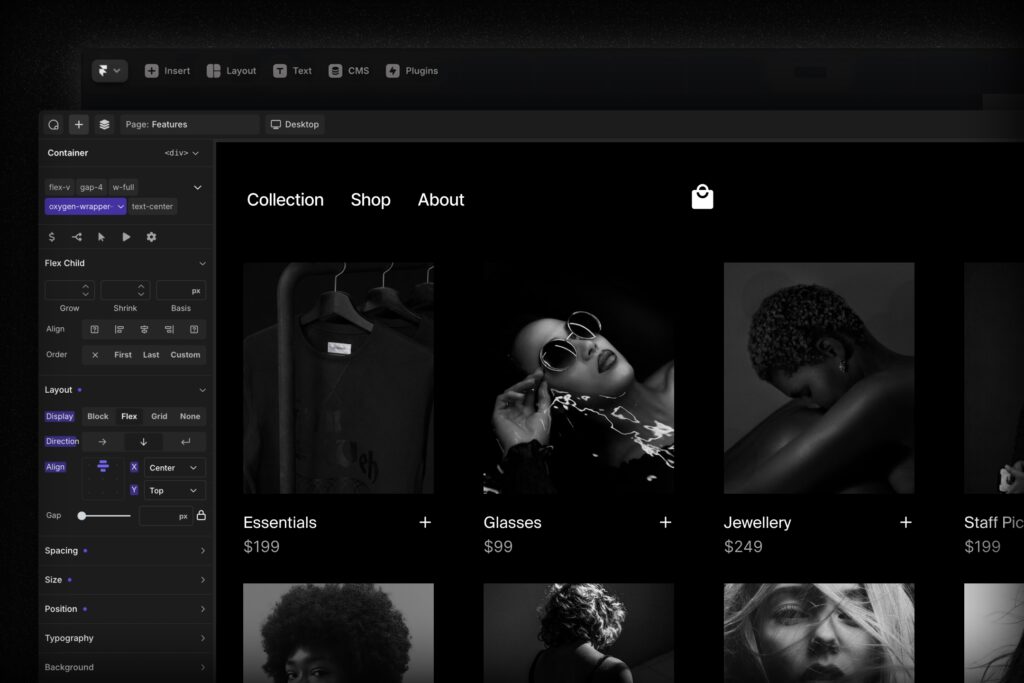
With these, you can build responsive layouts, add animations, and customize designs in a drag-and-drop interface — much closer to Framer’s visual workflow.
Beyond design, WordPress shines with:
- Content power: robust CMS for blogs, multi-author publishing, complex content structures.
- E-commerce flexibility: WooCommerce enables fully-fledged online stores.
- Plugins & integrations: 60,000+ plugins for SEO, analytics, memberships, and more.
- Ownership & control: you choose your hosting, performance optimizations, and scalability strategy.
Weaknesses vs Framer
- Maintenance overhead: WordPress sites need regular updates, backups, and security monitoring.
- Performance tuning required: without optimization, sites can become slow or bloated.
- Design polish varies: unless you’re skilled or use premium templates, achieving Framer/Webflow-level aesthetics takes effort.
- Learning curve for beginners: simpler than coding, but still less intuitive than all-in-one no-code builders.
Best use cases
- Content-heavy websites (media, education, nonprofits) that need scalable CMS features.
- Businesses needing flexibility — custom integrations, memberships, booking systems.
- Agencies and freelancers who want reusable templates and control over hosting costs.
- Brands that want to own their infrastructure rather than being locked into one SaaS platform.
2025 trend: More designers are pairing WordPress with lightweight modern page builders (e.g., Bricks, Oxygen) or going headless with a Jamstack front-end, making WordPress a hybrid between enterprise CMS and design-driven website builder.
3. Wix
What it offers
- Very beginner-friendly, drag-and-drop, many templates, lots of “extras”/features.
- Good app marketplace, tools for small storefronts, marketing etc.
- Faster to launch simple sites.
Weaknesses
- Design control / precision less strong (if you want pixel-perfect, complex layouts or unusual interactions).
- Performance issues can crop up if you overload with apps/widgets.
- Some limitations in content structure / SEO when you want deep optimization.
Best use case
- Startups or small businesses needing speedy MVPs, event microsites, portfolios.
- Non-designers or clients who want to manage their own site without much help.
- Sites where cost, ease, and speed matter more than extreme customization.
Our Recommendations (Who Should Use What)
If design precision and scalability are your top priorities → Go with Webflow.
If you want full control, rich content management, and endless flexibility → WordPress is your best bet.
If you value speed, simplicity, and low maintenance → Wix will do the job.
If you need help with WordPress or Webflow, we are ready to help – give us a call.


